
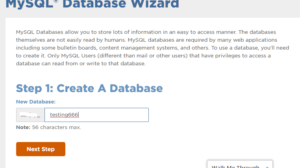
MySQL Database lets you save (and access) large amounts of information with ease. This facility required by many web-based applications, such as bulletin boards, Content Management System (CMS), and others. You need to create your own database prior to using it. Only users who have the privilege or a special authority can access a database. […]
Blog
WordPress security tips and tricks

Having a secure website is the desire of all bloggers. Because one of the factors in the survival of a website depends on the security level. One of the CMS used to create a website is WordPress. Well, what would happen if our WordPress website is not secure? It could be our data content or […]
Tips for choosing a web hosting service

When choosing a web hosting service, some of the things to consider is the type of service and its availability. Regardless of the chosen web hosting services play a leading role to develop the site into the appropriate. The following are some useful tips that you can use to choose the best hosting service. Tips […]
How To Create Subdomain in cPanel
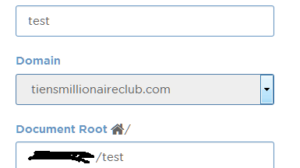
You can create subdomain in your cPanel. Here is the tutorial. 1. Login to your cpanel. 2. Search “Domains” 3. Click “Subdomains” 4. Enter your desired subdomain address. 5. Enter the path to the directory where your subdomain files in the appropriate fields below Document Root, column directory path will be filled automatically, but you […]
7 Easy Steps How To Change Domain Name in WordPress

If you would change your domain name, here are The Steps How To Change Domain Name in WordPress
5 Tips for Using your name as a Domain Name

When you are considering to buy a domain name for the purposes of personal branding, there are some basic things that need to be considered in determining your personal domain, such as a domain name should be easy to remember, clear and suitable for long periods of time. Considering that all important things, then a […]
Make Stock Images from Royalty Free Images Stock

A picture says a thousand words. The needy for imagery pictures are getting demanding recently, to get a more lively intention of conveying messages and a proper communication. On an occasion or probably often, one will need some image to strengthen the message of their presentation, gives a correlate background for your blogs or advertising […]
Host Your Web with Cheap Domain Registration Hosting

Host Your Web with Cheap Domain Registration Hosting – What is the use of the name will be significantly matter in the world of virtual networking. The domain name you choose to identify yourself or companies or businesses in the internet communication will lead you to your causes, especially when you are starting online businesses. […]
How to login to cpanel account

How to login to cpanel account? To access your cPanel account, you can type http://www.yourdomain.com/cpanel in your browser. As an alternative, you can also access cPanel account by typing http://www.yourdomain.com:2082 or http://www.yourdomain.com:2083 in your browser. Then you will see the login screen like below. Enter your username and password, and then click Login. You can […]
Important Things You Should Know About cPanel

cPanel is the market leader in platform hosting market today. Many web hosting services who choose cPanel because of its ease and truly complete. Also comes with a quality that is already guaranteed. Here are 5 important things you must know to manage cPanel. 1. Use a Strong Password Here are some tips that you […]
How To Install WordPress Manually Using File Manager?
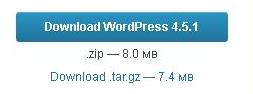
We can install wordpress manually or automatically using Fantastico. On this occation, we explain how to install wordpress manually. Download WordPress Script. Here’s step by step to download wordpress cript: You can download the latest version of wordpress at https://wordpress.org/download/. Click download wordpress (version) Upload wordpress files using File Manager. After extracting wordpress files, the […]
How to fix can not Update Database After Update WP Version?

I have a problem after update WordPress Version, when I’d like to access wp-admin, I find a message like this: Database Update Required WordPress has been updated! Before we send you on your way, we have to update your database to the newest version. The update process may take a little while, so please be […]